Browsing Umbraco Logs in Kudu
A while back I wrote two userscripts that improve the Kudu interface for Umbraco Cloud (one for the Windows event log, one for deployment monitoring). Both make raw data that’s already there a lot more usable.
The same problem exists for application logs. Umbraco writes structured logs in Serilog compact JSON format, one JSON object per line.
Finding the right file is already a needle-in-a-haystack problem before you’ve even opened it. On a long-running project there can be hundreds of log files in the directory, and Kudu’s file listing caps out at a fixed number of entries, so older files simply don’t show up, unless you “hack it” using javascript (by increasing the value of maxViewItems in localStorage to a huge number).
And when you do open one, you’re staring at a wall of unformatted JSON.
Umbraco’s backoffice already has a decent log viewer. It parses the same Serilog JSON, lets you filter by level, and supports expression queries. The problem is it’s only available when the site is running. If your site won’t start (a failed upgrade, a missing dependency, a bad config change), the backoffice is exactly what you can’t reach. Kudu is still there, the log files are still there, but there’s nothing to help you read them.
For Umbraco Cloud projects, you can download the file through the Cloud portal, but it’s SLOW, and you still have to open it in a text editor - or the amazing Compact Log Viewer by Warren Buckley.
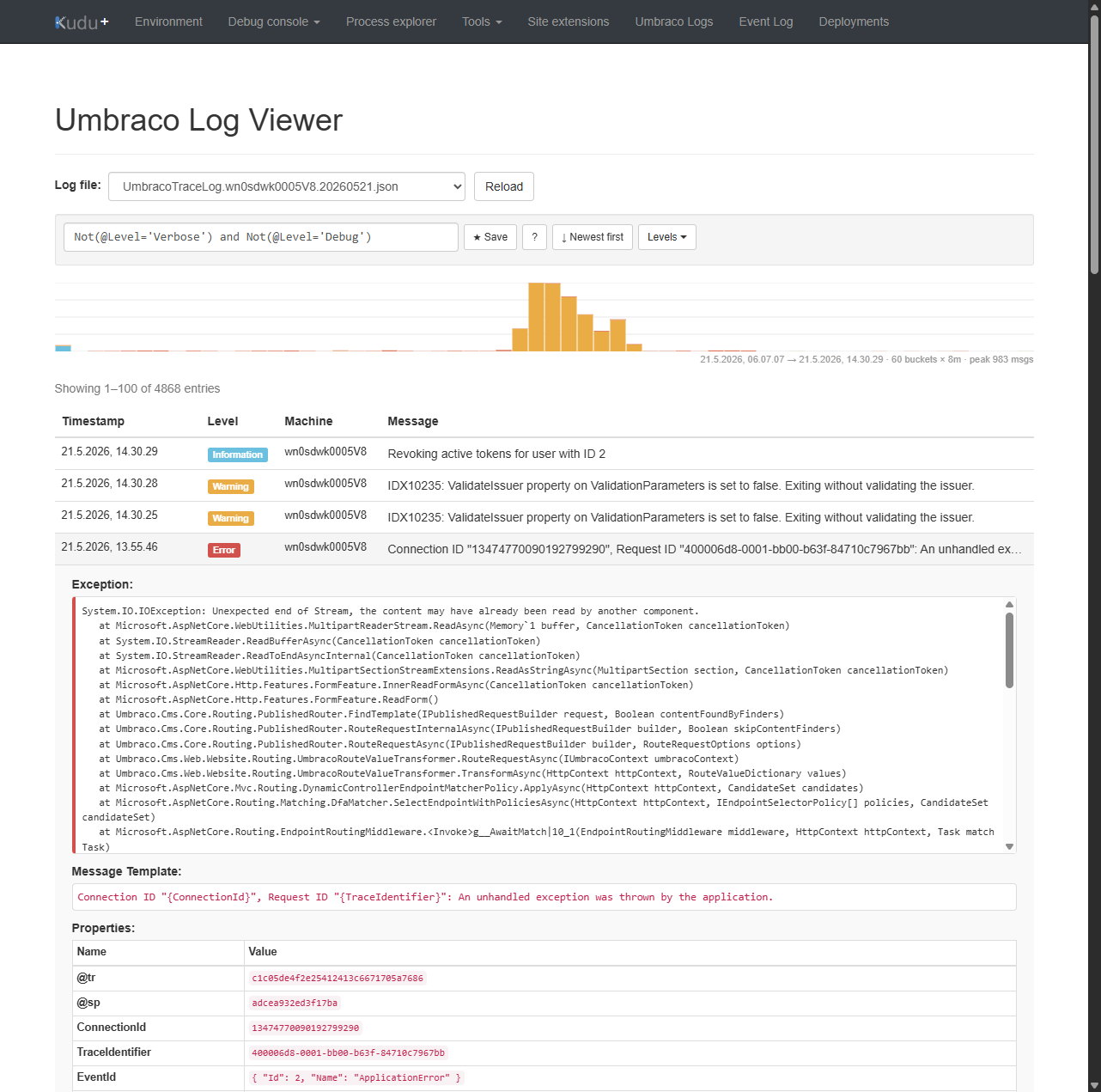
So I built a third script: a log viewer that runs inside the Kudu tab you already have open, inspired by the backoffice Log Viewer but available even when the site is completely down.
What it does
Installing the Kudu Umbraco Log Viewer adds an “Umbraco Logs” link to the Kudu navbar. Click it and you get:
- File picker: lists
.jsonlog files from/umbraco/Logs/, sorted newest first, grouped by month so large archives are scannable at a glance. - Parsed log entries: each line is parsed from Serilog compact JSON. The
@mtmessage template is rendered with its property values when the pre-rendered@mfield is absent. - Expandable rows: click any entry to see the exception stack trace, the raw message template, and all structured properties in a nested table.
- Color-coded level labels: Badges for Verbose, Debug, Information, Warning, Error, and Fatal.
- Level filter: a dropdown with per-level checkboxes.
- Sort toggle and client-side pagination at 100 entries per page.
Expression search
The search box accepts either plain text (substring match) or a Serilog-compatible expression (the same syntax you’d use in the backoffice Log Viewer).
Some examples:
@Level='Error'
Not(@Level='Verbose') and Not(@Level='Debug')
@Message like '*timeout*' or @Level='Fatal'
MachineName='web01'
@Exception like '*SqlException*'
Supported: @Level, @Message, @Exception, @mt, @t, any structured property, operators = / != / like (glob */?) / > / >= / < / <=, and boolean And / Or / Not(...).
There’s also a ? button that opens a cheat sheet with clickable example queries.
For queries you use often, the ★ Save button persists named searches to localStorage.
Momentum graph
Above the log table there’s a stacked bar chart split into 60 time buckets covering the full span of the log file. Each bar is broken down by level.
The bars are clickable: clicking a bucket jumps to the page containing those entries.
For a large log file this gives you immediate orientation before you’ve typed a single query. You can see exactly when an error spike happened and click straight into it.
Updates to the existing scripts
Both the Event Log Viewer and the Deployment Viewer got a v1.1 update alongside this release:
@updateURLand@downloadURLadded to all three scripts. Tampermonkey can now auto-update them without a reinstall.@matchreplaces@includefor better cross-browser compatibility.- XSS fixes: user-facing values rendered into
innerHTMLare now properly escaped in both scripts. - Deployment Viewer: log line rendering was duplicated in three places; extracted into a single
renderLogLinesfunction. ThetriggerNewDeploymenthandler was also fixed: v1.0 fired a success toast on asetTimeoutregardless of the response; v1.1 awaits the fetch and only toasts on the actual HTTP result.
Installing
All three scripts are in the umbraco-userscripts repository. Each has a one-click install link in its README. You need Tampermonkey (available for Chrome, Firefox, and Edge).
The scripts are zero-dependency, single-file IIFEs. No build step, no npm. Install from the raw GitHub URL and you’re done.
Tip: With
@updateURLin place, Tampermonkey will check for updates automatically. You can also trigger a manual check from the dashboard.
Final Thoughts
I hope these scripts save you some time. They’re simple, focused, and designed to work with the tools you already have. If you find them useful, great! If you have ideas for improvements or run into issues, feel free to open an issue on the repository.
🇩🇰👑 And a happy birthday to King Frederik X of Denmark!